
Luksgazino Register: The Journey to Your First Account
There are two ways to open your first account. You can register with your phone number. You can also register with your email. The form is short and takes a few minutes. Once done you log in with the same details. One confirmation is required before you submit. You confirm you are over 18. You also accept the terms of use.
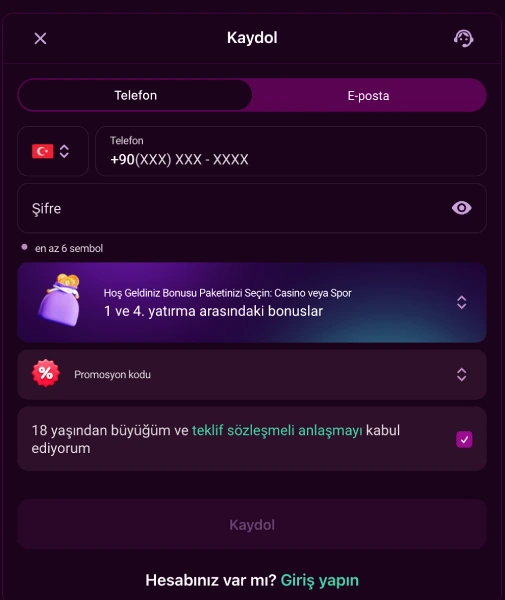
The First Screen You See: Two Tabs
The registration screen shows two tabs. Your choice also decides your later logins:
| Tab. | Information Needed. |
|---|---|
| Phone. | Country code (default +90) and a number in +90(XXX) XXX-XXXX format. |
| Email. | A valid email address. |
The phone tab fills in the country code for you. The default code is +90. You type your number to match that pattern. The email tab only needs a valid address.
The Fields You Fill In After Choosing a Tab
Once you pick a tab, the rest of the form opens. These fields are the same for both methods:
- Password: at least 6 characters. A show or hide key sits on screen.
- Welcome package: you choose between Casino Package, Sports Package or no bonus.
- Promo code: optional, you type it here if you have one.
- Consent checkbox: you confirm you are over 18. You also accept the Offer Agreement.
The "Register" button stays inactive if a required field is empty. Password, contact detail and the checkbox are required for it.
After You Submit: The Identity Verification Path
The registration form asks for your first and last name. Your identity details are also requested. Writing them in Latin letters helps. The operator may check your age. It may also check your country of residence. A separate step comes before any withdrawal request: document upload. This runs through an independent provider called KYCAID.
The document upload form offers three options:
- ID card.
- Passport.
- Driver's license.
You can upload the document from a computer. You can also finish the process from your phone. After choosing the type you send the file with the "Submit" button. Before a withdrawal, three steps must be completed on your account:
| Step. | Description. |
|---|---|
| Phone confirmation. | Verifying your registered phone number. |
| Email confirmation. | Verifying your registered email address. |
| First real deposit. | Your first deposit made with real money. |
A withdrawal request is not processed until all three are done. You can check your status from the account panel.
An Extra Option at Your First Login After Registering
At registration you only enter phone or email. Things change once your account opens. A third path appears at login: account ID. The system assigns this number to your account. On the login page you can type it with your password. All three methods open the same panel.
Registering for the First Time on Mobile
You can also open the registration form on a mobile browser. The form keeps the same fields. The tab layout stays the same too. On Android you install the app via QR code; the file is an APK. Installation needs permission for unknown sources. On iOS there is no official store app. Instead you use "Add to Home Screen" in Safari. Full setup steps sit on the mobile app page.
The One-Account Rule
Under the rules, one person may open only one account. A second account breaks the rule. A second account under a different phone or email also breaks it. Transfers between accounts are forbidden. Withdrawals go out through the method you deposited with. Your IP address and browser details are logged automatically.
Right After Registering: The Trial Bonus
A new user who confirms phone and email unlocks one offer. That offer is the 500 TRY trial bonus. No deposit is required for it. The only requirement is phone and email confirmation. Once confirmed you can make your first real deposit from the deposit page.
Age Limit and Closing Your Account
The consent checkbox on the form is a declaration. It states that you are over 18. This requirement is mandatory for registration. If you want to pause your account, one path exists. You can send a request once every 90 days. You send it from your registered email. The account closes once pending payouts are settled. A new request needs at least 30 days.
Find general information about registering on the homepage.
Frequently Asked Questions
Should I register by phone or by email?
Both work. You use the same detail again at login, based on the tab you chose.
What documents are asked for after registering?
Document verification runs through KYCAID. You upload an ID card, a passport or a driver's license.
Can one person open a second account?
No. Under the terms of use, each user may open only one account.
Can I withdraw right after registering?
No. Phone confirmation, email confirmation and a first real deposit must be completed first.
Do I need a deposit for the trial bonus?
No. The 500 TRY trial bonus needs no deposit. The requirement is phone and email confirmation.
Frequently Asked Questions
Should I register by phone or by email?
Both work. You use the same detail again at login, based on the tab you chose.
What documents are asked for after registering?
Document verification runs through KYCAID. You upload an ID card, a passport or a driver's license.
Can one person open a second account?
No. Under the terms of use, each user may open only one account.
Can I withdraw right after registering?
No. Phone confirmation, email confirmation and a first real deposit must be completed first.
Do I need a deposit for the trial bonus?
No. The 500 TRY trial bonus needs no deposit. The requirement is phone and email confirmation.